

Whether you manage a gated apartment complex in Mangaluru or run a corporate office in Bengaluru, one question is becoming increasingly important: who’s at the door, and should you let them in? A video door phone system answers that question instantly and securely.
Gone are the days of buzzer-only intercoms or rushed trips to the entrance gate. Today’s video door phone systems combine live video, two-way audio, remote access control, and network integration into a single, intelligent solution. This guide walks you through everything you need to know from how these systems work to how to get one set up in your building.
Table of Contents
What Is a Video Door Phone System?
A video door phone (VDP) system is a security and communication solution that lets building occupants see and speak with visitors at an entrance point before granting access. It typically consists of an outdoor camera unit with a speaker and microphone at the door, and an indoor monitor or IP phone that displays the live feed and enables two-way communication.
Modern systems go further. IP-based video door phones connect over your existing network, enabling features like remote viewing via smartphone, integration with access control systems, cloud recording, and even elevator control all without complex dedicated wiring.
Key Components of a Video Door Phone System
Before setting up a system, it helps to understand the building blocks:
- Outdoor Door Station
This is the unit installed at the entrance a weatherproof panel with a built-in camera (usually wide-angle), a microphone, a speaker, and sometimes a keypad or card reader. Visitors press a button to initiate a call. - Indoor Monitor or IP Phone
The indoor unit receives the call, displays live video of the visitor, and lets the occupant speak back. In IP-based systems, this can be a dedicated touch-screen monitor, a standard IP desk phone, or even a smartphone app. - Network Switch or PoE Switch
IP video door phone systems run over an Ethernet network. A PoE (Power over Ethernet) switch powers the door station and indoor units through the same cable that carries data simplifying installation significantly. - Access Control Integration
Many systems integrate with electric door locks, magnetic locks, or turnstiles. A single tap on the indoor monitor can unlock the door remotely without the visitor needing a key or card. - Server or Cloud Management
Enterprise setups often include a management platform for recording visitor logs, managing user permissions, and monitoring multiple entry points from a central dashboard.
Know About Access Control
Step-by-Step: How to Set Up a Video Door Phone System
Step 1 Site Survey and Planning
Start by mapping out all entry points: main entrance, parking gate, delivery bay, or service entrance. Identify where indoor units will be placed (reception desk, security cabin, each apartment unit, or manager’s office). This determines the number of door stations and monitors required, as well as cabling routes.
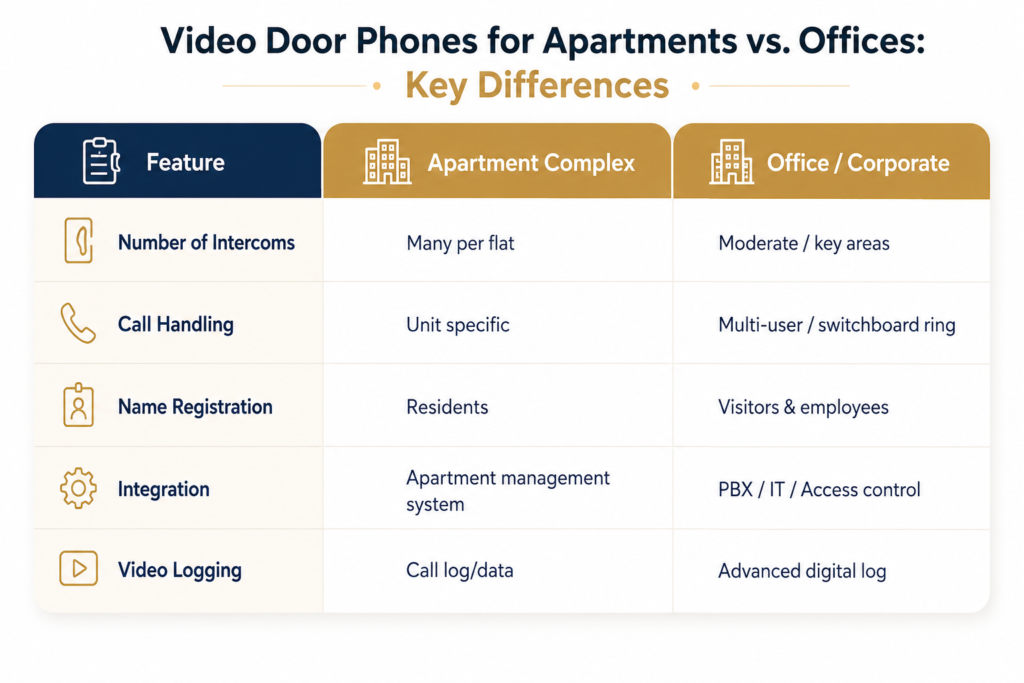
For apartment complexes, the setup typically uses a central server with individual indoor units for each flat. For offices, the reception monitors the door while specific employees can receive calls on their IP phones or mobile apps.
Step 2 — Choose the Right System Architecture
For small offices or single-entry buildings, a standalone IP video door phone with a PoE switch and two to four indoor units is sufficient.
For larger installations multi-storey apartments, hospitals, or corporate campuses — an IP-PBX integrated system is more appropriate. Here, the video door phone operates as a SIP endpoint on your existing VoIP network, allowing calls to route to multiple extensions simultaneously and enabling mobile app access for remote staff.
Step 3 — Infrastructure and Cabling
Run CAT6 Ethernet cables from the network switch to each door station and indoor monitor location. If your building already has a structured network, these endpoints simply join the existing LAN. PoE switches eliminate the need for separate power outlets at each device a significant advantage in retrofit installations.
Ensure the outdoor door station is installed at an appropriate height (typically 1.4 to 1.6 metres) with the camera angled to capture visitors’ faces clearly, even in low-light conditions.
Step 4 — Device Configuration
Once hardware is in place, configure each unit on the network:
- Assign static IP addresses to the door stations and indoor monitors, or configure them via DHCP with reserved leases
- Register devices as SIP extensions on your IP-PBX or the system’s built-in SIP server
- Set up call routing rules for example, a visitor pressing the intercom button triggers a call simultaneously to the reception desk and security cabin
- Configure door release settings, defining which indoor units have unlock authority
Step 5 — Access Control and Integration
Connect the door station’s relay output to your electric lock or access controller. When an authorised indoor user clicks “Unlock,” the relay triggers and opens the door. For advanced setups, integrate the video door phone with your existing access control platform to maintain a unified audit trail of who entered, when, and how.
Step 6 — Testing and Handover
Test every entry point and indoor unit. Verify audio clarity, video resolution, door release function, and mobile app connectivity. In multi-tenant buildings, walk through the system with residents or facilities managers. Document extension numbers, admin credentials, and support contacts.
What to Look for When Choosing a Video Door Phone System
Not all systems are equal. Here’s what matters most for Indian apartment and office deployments:
- IP/SIP Compatibility — Ensures the system works with your existing VoIP or IPPBX infrastructure rather than requiring a parallel network
- PoE Support — Reduces installation cost and complexity, especially in retrofit projects
- Mobile App Access — Essential for building managers or remote employees who need to monitor entry points from anywhere
- Wide-Angle Camera with Night Vision — Covers more of the entrance area and remains effective after dark
- Weather and Vandal Resistance — Outdoor units must be rated IP65 or higher for Indian climatic conditions
- Multi-Tenant Management — For apartment complexes, the system should allow individual unit control while giving the security desk a master view
Video Door Phones for Apartments vs. Offices: Key Differences
Conclusion
A video door phone system is no longer a luxury reserved for high-end properties it is a practical, cost-effective security upgrade for any apartment complex or office that values controlled access and resident safety. As IP-based systems become more affordable and easier to integrate with existing network infrastructure, there has never been a better time to make the switch from legacy intercoms.
At Electro Core Systems, we specialise in end-to-end deployment of IP video door phone systems for enterprises, residential complexes, hospitals, and educational institutions across Mangaluru and Karnataka. From site survey to configuration and post-installation support, our team ensures your entry security is reliable, scalable, and ready for the future.
📞 Ready to secure your building’s entry points? Contact Electro Core Systems at +91 7353022229 or email us at electrocoresystemsmlr@gmail.com to schedule a free consultation.